TeacherFlows
Submitted on October 2, 2025

Short Description: Organize teaching tabs, lessons & resource. Calm your chaos.
Teachers often juggle dozens of open tabs, files saved to the desktop and resources scattered across different places. When you’re in front of a class the last thing you need is to waste time hunting for that one link or document.
I built TeacherFlows to solve that problem. It’s a free Chrome extension designed to help teachers keep everything in one place and ready to use.
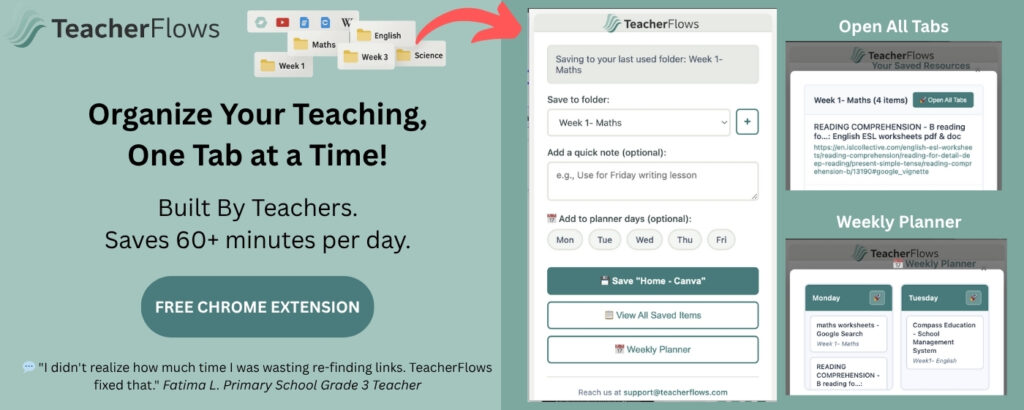
With TeacherFlows you can save tabs and online resources into folders by week, subject or topic so you never lose track of resources. You can add notes to remind yourself how you planned to use a lesson and you can view everything in a simple calendar so your week is laid out clearly. When it’s time to teach or print, you can open all your saved tabs in one click, without digging through files or re-Googling.
One of the biggest frustrations for teachers is the clutter that builds up on their desktop from downloading files they only need once. TeacherFlows removes that problem by letting you save and reopen tabs directly, keeping your desktop clean and your workflow simple.
It was built for teachers, with the goal of saving time and reducing stress. It installs in seconds, is completely free, and genuinely makes lesson preparation and delivery smoother.
If you’re looking for a way to cut through the chaos and bring a little calm back into your teaching day, TeacherFlows might be what you’ve been missing.